
SkyGrid
Aerial operation system
My Role
-
1 product designer (me)
-
2 product managers
-
8 developers
Tools
-
Figma
-
Jira
-
Miro
The Problem
There's no established playbook for designing drone traffic management software. When Boeing's SkyGrid brought me on as the sole designer in 2019, we were building a product for an industry that was still being invented. The challenge wasn't just UX — it was figuring out what the product needed to be in the first place. As the only designer on the team, I owned the end-to-end experience from early research to launch. From interviewing our potential customers, I learned how they would utilize drone operations in their businesses, and created the experience based on their feedback.
Project result
On the consumer side
2350
monthly active users in the first 6 months
On the enterprise side
3 clients
gained in the first 6 months
The Approach
We started with enterprise customers. SkyGrid invited potential customers — including UPS and BP — to work sessions where we mapped out how aerial operations could realistically fit into their logistics. I sat in those meetings and asked UPS and BP about their vision of utilizing drone operations. Those conversations shaped everything: the mission types we designed for, the data hierarchy in the interface, and the tradeoffs between automation and human oversight. I translated those insights into conceptual wireframes, iterated through feedback, and drove the work to high-fidelity production-ready interfaces.
Potential customer #1
UPS
UPS needs to make different types of deliveries by the millions daily. Currently, many delivery drivers deliver the packages to the final customer. Utilizing drones would reduce the need for drivers, and reduce the costs significantly. We invited them into our office, and I asked them what they would need from SkyGrid to help with their operations, and this is what they told us.
Flight & Route Management
-
AI-powered risk scoring with the ability to tweak routes and recalculate on the fly
-
Support for UPS-specific location identifiers ("Slicks") alongside GPS/address inputs
-
Package input data: start/end location, dimensions, weight, and hazmat content category
Vehicle-Aware Operations
-
The drone's return-to-base must account for the truck potentially having moved since launch — always targeting a stationary landing point
Maintenance Tracking
-
Hours, cycles, maintenance activity, and part number tracking
-
Pre-flight and post-flight check logging
-
A system purpose-built for UAVs (their existing maintenance system is not suitable)
Compliance & Records
-
Flight, maintenance, and crew records
-
E-logbooks, discrepancy reporting, pass cards, and type certification
-
Coverage for FAA Part 135 requirements at minimum
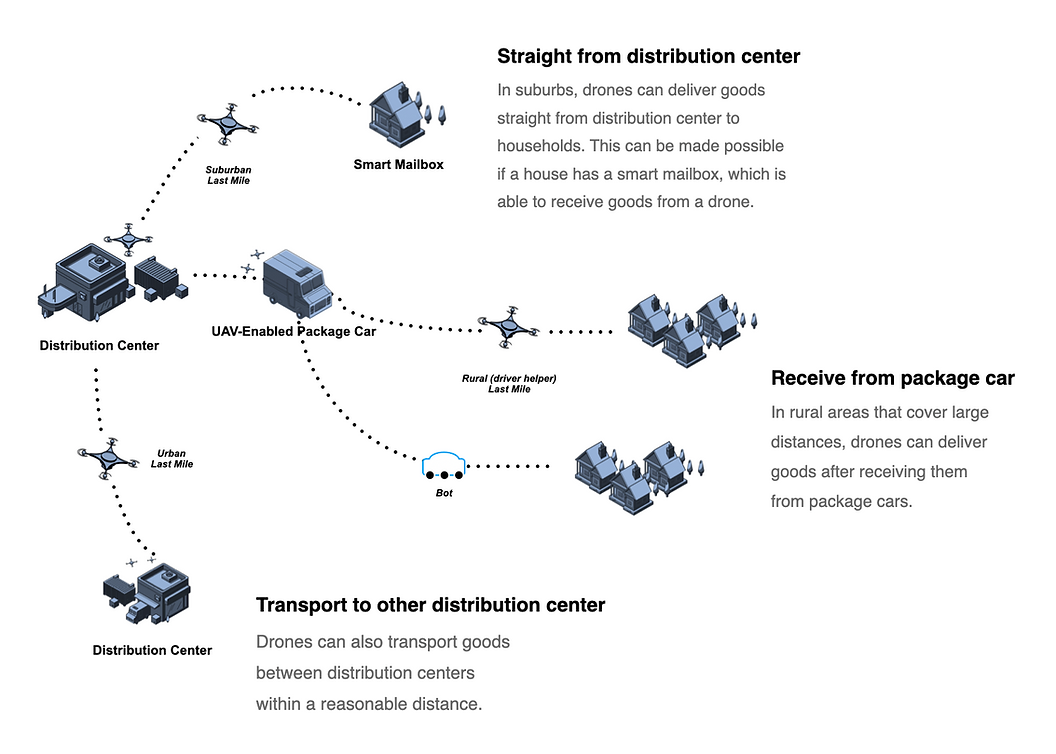
Here is a look at the Last Mile Delivery flow in detail.
UPS wants one unified platform that handles everything — they're not interested in stitching together siloed tools. We also discussed and formed a plan of how the drone operation would be implemented during a delivery process in detail.
Potential customer #2
BP
BP, multinational oil and gas company, is interested in SkyGrid's drone operations. BP is specifically interested in drone flight management as part of a broader AI-powered operations vision. Here's what's relevant to SkyGrid:
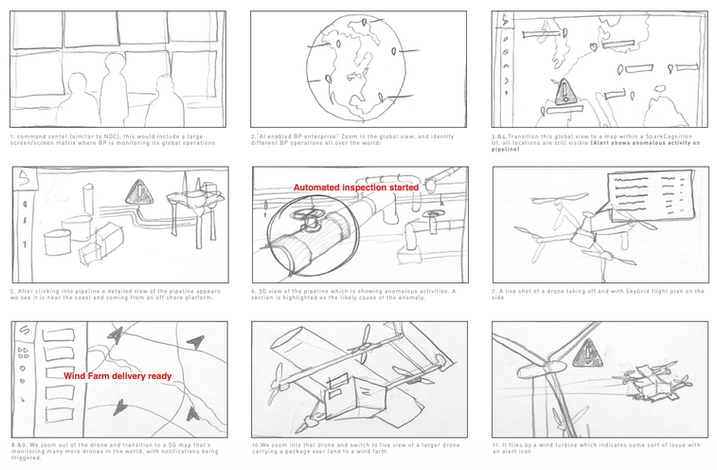
Pipeline Inspection
-
When an anomaly is detected on a pipeline (via SparkCognition's AI), a drone is automatically dispatched to inspect it
-
SkyGrid would provide the flight plan alongside the live drone feed
-
This suggests BP wants automated, event-triggered drone deployments — not manual flight planning
Global Fleet Monitoring
-
A SkyGrid map monitoring many drones simultaneously across global operations
-
Notifications and alerts triggered in real time
-
BP wants visibility across their entire drone fleet from a single command center view
Wind Farm Operations
-
Drones delivering components/packages to wind farms
-
Automated inspection of wind turbines, with alert icons flagging issues mid-flight
-
SkyGrid would need to support both delivery and inspection mission types
BP wants automated, trigger-based drone operations tied into upstream AI alerts, not manually initiated flights.
Each potential customer has a different use case.
I started by taking all the findings from meeting with our potential customers, analyzing their needs from SkyGrid, then started on the user flow. I aimed to incorporate a variety of mission types into the mission creation process.

-
AI-powered drone delivery
-
Support for UPS-specific location identifiers
-
automated, event-triggered drone deployments
-
Automated inspection of wind turbines

Other confidential clients
-
Development of electric flying cars
-
Electric vertical takeoff and landing vehicles
Confidential client
-
Urban-level Air Traffic Management
-
City-wide ground traffic surveillance
Confidential client
SkyGrid needs to provide a variety of mission types.

Area exploration
-
Land survey
-
Inspection
-
Mission sweeps
-
Search and rescue
-
Aerial photography
Object-centric exploration
-
Object survey
-
Inspection
-
Search and rescue
Way-point exploration
-
Delivery
-
Transportation
-
Inspection
-
Return-to-base
Object-centric exploration
-
Aerial photography
-
Inspection
-
Transportation
To sum up what our customers need from us
AI-driven mission creation
Ability for AI to identify optimized delivery routes with all environmental factors considered.
Mission fulfillment
SkyGrid should be able to handle a variety of mission types for customers of different industries.
Fleet management
AI should automatically be aware of all fleet status, and plan upcoming missions based on fleet status.
FAA compliance
Ability to automatically check regulatory compliance of flight routes, mission requirements, weather conditions.
Optimized routes
Give the user a few route options, and give a risk score of each route option.
I created personas from our customer needs
Fleet manager
Oversees all drone operations from a central hub.
Goal: see the full picture of fleet status at a glance.
Pain point: too much data, needs SkyGrid AI to surface only what matters.
Remote pilot in command (RPIC)
Authorizes and monitors flights remotely.
Goal: confidence that every flight is safe to launch.
Pain point: responsible for compliance and emergency decisions across multiple simultaneous flights.
Maintenance personnel
Keeps the fleet airworthy.
Goal: accurate, up-to-date logs for every aircraft.
Pain point: existing systems aren't built for UAVs.

I was deciding between whether to let the user select mission type first, or set starting point first. Initially, I put "Select mission type" before "Set starting point". However, after showing the user flow to potential customers, they told me that they would have scenarios that have several mission types in one trip. That is why I put "Set starting point" before "Select mission type."
Explore user flow
SkyGrid needed to support multiple types of missions — way-point delivery, area survey, and object inspection — each serving a different customer and use case. Rather than designing separate flows for each, I identified a shared creation and execution structure that works across all mission types, with the mission type selection as the key branching decision. The flow also accounts for off-nominal scenarios: when the RPIC is unresponsive, the drone returns to base automatically; when a destination is blocked, it tries pre-selected backup zones before aborting — keeping human oversight in the loop without requiring constant manual intervention.
Create flight plan
Set starting point
Select mission type
Way-point
Area survey
Object survey
AI route options
Review & select route
RPIC authorizes launch
"Set starting point" & "Select mission type", which comes first?
Execute mission
In-flight monitoring
RPIC unresponsive
Verify destination
Zone not clear
Completes mission
Return to base
Try backup zone
Zones exhausted


Explorations
I synthesized findings across all interviews, identified common patterns, and translated them into wireframes and prototypes — prioritizing the features most critical across all enterprise use cases.
Version 1
When I first started on the design, this was the first UI design ever. There were no previous designs, and I started the user flow and design based on the user feedbacks of UPS and BP. I made the interface show all flight status, show environmental layers, and which flights need attention. I chose the interface colors based on the SkyGrid logo colors. The design system and components were built as I was building the interfaces.
Issues with Version 1
When I showed version 1 to our potential customers, there biggest feedback were that it was not apparent what flight status, area conditions, and needed actions to take. Overall, they felt that they were not given a complete picture of the flight operation. The process was not automated enough. Much of the weather issues should be predicted, and solved by AI, without the need to inform the user.

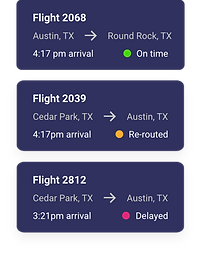
Our potential customers wanted SkyGrid AI to give them a complete picture of fleet status, and I attempted to show all flights, their starting point and destination, arrival time, and flight status.
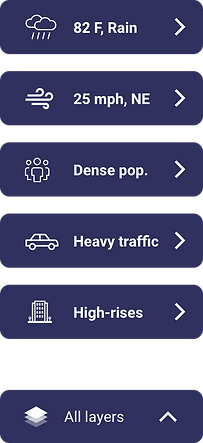
I attempted to show environmental conditions by surfacing the most relevant data to the map.
Version 2
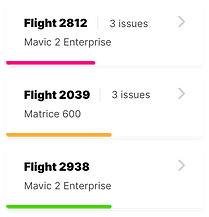
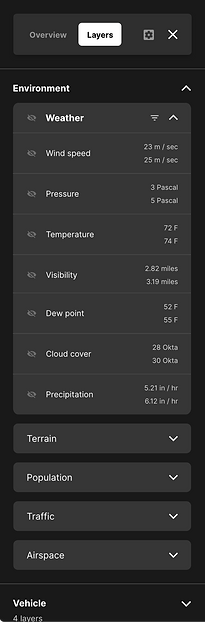
To address the feedback for Version 1, I redesigned the user flow and interface. The flight status are more apparent, with line length indicating the completion %. The flight status are introduced as filters on the top. The environmental layers are more detailed, yet the data are presented more simply.
Flight card update
I updated the flight card to show the flight status in a line, to indicate completion %, and have colors to represent urgency. The lines made them easier to scan for the user.
Environmental layers update
The updated environmental layers show more categories of data, but more organized. The data are separated into 5 main categories, allowing the user to navigate easily. The user can turn on and turn off each layer on the map.

Mission creation flow
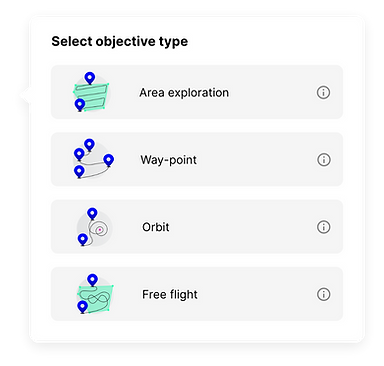
The ability for a user to create a mission that fits into the operation was the common need among our potential customers, and I explored several options to look for the most intuitive user flow to create a mission.
Suitable for a variety of missions
Based on the feedbacks of our potential customers, I designed the user flow that allows the user to create different kinds of missions, choose from a list of actions at each point of the mission. The user can choose from several kinds of flights, from point A to point B, or an orbit flight, or exploring an area, depending on what kind of mission is needed.

Way-point mission
Area exploration
SkyGrid AI
SkyGrid AI's main expertise is identifying the best flying route options for our customers. A user can simply enter a starting point, a destination on our map, and we will provide some optimized route options. Our AI takes many factors into account when coming up with optimized routes, including:
I designed the route selection view to give the user the most optimal route, without having the user to know all the details of the environmental conditions. If the user chooses to view the environmental conditions, the user can view them by clicking on the dropdown.


Airspace conditions
SkyGrid AI provides all the environmental conditions of any area to the user, giving the user a complete picture of the environment.
Real-time changes
SkyGrid AI receives airspace changes in real-time, and updates the best route in real-time during a mission.
Optimized routes
Give the user a few route options, and give a risk score of each route option.
Regulatory data
SkyGrid AI takes into account all regulatory data from the FAA when creating the best routes for missions.
The use has a choice to view the data, or let SkyGrid AI do the work.
When I was designing the flights view, I kept in mind the feedbacks from our potential customers: they want a drone operation that works automatically, without having to do too much manual work. This is where SkyGrid AI comes in handy. SkyGrid AI has all the data of the environmental condition, but I should only surface data that the user needs. The AI should solve a lot of traffic issues by itself.
When designing the flight card, I kept in mind to only show the information that the use needs, which are completion%, urgency levels, basic mission information. This allows the user to have a bigger picture of the operation, without being overwhelmed.
When there is an issue when a flight, SkyGrid AI should solve the issue in the background, and keep a record of it. The user is able to view the past events of the flight, if the user chooses to.

Most of SkyGrid AI work in the background, but the user can access them.
The users need confidence that their fleet is under control — even when they're not actively watching. SkyGrid is designed to anticipate issues before they surface and resolve them autonomously, so the users aren't burdened with constant intervention.
When the users do want visibility, it's always available. I designed an environmental layers system that organizes airspace conditions into clear categories. Toggling a layer reveals the exact conditions of any area — including the range of values and a safety rating — giving users a complete picture on demand, without overwhelming them by default.
SkyGrid AI provides the route score, but the user can see the reasons.
Discussions with engineers on developing the environmental layers
When I initially presented the environmental layers to the engineers, they were resistant to dedicating a lot of efforts to this feature, and wanted to present every layer separately, without categories. The reasons for their response were:
The layer categories feels too complex.
There are many layers, and several categories. The engineers felt that it is more complex to develop the categories. And it takes way more development efforts.
Can we develop the layers separately first?
The developers wanted to see how it would look to develop the layers individually.

Design proposal

Engineer's work
The engineers initially built the layer panel with every layer displayed individually and unsorted. When I reviewed it, I immediately saw the problem — without any grouping or hierarchy, the list would grow unwieldy fast, making it hard for operators to find what they needed. On top of that, our design included alert indicators at the individual layer level, the subcategory level, and the category level, which made clear organization even more critical.
I advocated for consolidating the layers into three clearly named categories — terms intuitive enough that users could anticipate what lived inside each one without having to expand it. Grouping related layers together would let operators scan quickly, surface relevant items in context, and act on alerts at the right level of hierarchy.
After pushing for this structure — along with the alert system and data display approach — the team aligned on the direction, and engineering successfully implemented the categorized layer system as designed.
The Outcome
SkyGrid launched on the Apple App Store in September 2020 — the first milestone in a long roadmap. As the only designer on the team, I owned the end-to-end experience from early research to launch.
On the consumer side
2350
monthly active users in the first 6 months
On the enterprise side
3 clients
gained in the first 6 months
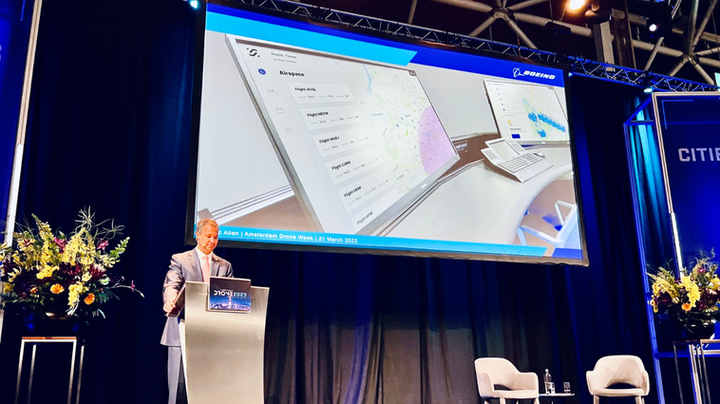
SkyGrid constantly collaborates with other aerospace organizations to improve the autonomous aerospace industry.
What I'd do differently
Start with a pilot, not a platform. We tried to design for every use case at once — UPS last-mile delivery, BP pipeline inspection, hospital networks. In hindsight, I'd have pushed harder to pick one mission type, nail it, and expand. The scope of Version 1 made it hard to give any single workflow the depth it deserved.
Build the design system earlier. I built components as I went, which created inconsistency between early screens and later ones. Starting with even a lightweight system of tokens and base components would have sped up iteration and made the V1 → V2 redesign less costly.
Test with actual RPICs sooner. Our early feedback came mostly from business stakeholders at UPS and BP — people thinking about the system, not operating it. Getting the product in front of actual remote pilots earlier would have surfaced the urgency and cognitive load issues we only discovered during the V2 feedback cycle.
Push back on the map-first assumption. Everyone assumed the flight map should be the dominant element. I followed that assumption into V1 without questioning it. In retrospect, the flight list and status indicators were what operators actually needed at a glance — the map was secondary. I'd spend more time stress-testing that core mental model before committing to a layout direction.
Document edge cases as design artifacts. Emergency checklists, off-field landings, RPIC-unresponsive fallbacks — these were handled in conversation but rarely made it into the design files. Those states matter enormously in a safety-critical product, and I'd treat them as first-class design problems next time.